Navigating With Your Mobile Phone
One of the most useful
applications for a mobile phone is software to help with navigation. In this
week’s installment the resourceful team from the Active Captain series show us
how the addition of a GPS and a navigation program can turn your phone into a
small chartplotter, giving you an onboard backup and a mobile navigation aid for
the dinghy or on shore.
 |
An increasing number of applications can turn your mobile phone into a chartplotter. |
Karen & Jeffrey Siegel © 2008 Active Corporation
Navigation programs include marine specific applications, as well as those
designed for use on land. For maximum productivity, you may want more than one
installed on your phone. We use both a marine navigation program and a street
navigation program, and have found both to be very useful.
In order to run these navigation programs on a mobile phone, you need to make
sure you have enough memory to hold the very large chart and map folios.
Thankfully, almost every high end mobile phone supports memory cards that can be
inserted to expand memory to many gigabytes of space. To store all the NOAA
charts for the entire East Coast, for example, takes more than one gigabyte of
space. It takes about 3 gigs to store every NOAA chart for the U.S. and its
territories. To store all of the maps for every street in the U.S. and Canada,
you'll need about 1 gig of storage.
Installing navigation programs to your phone is a snap. Installing the data can
be more cumbersome. The files are large and can take multiple attempts. It is
not uncommon to have files of 300 megabytes or more, which must be moved to your
phone in order to gain access. Choosing navigation applications for your mobile
phone is similar to choosing software for your computer: it takes a bit of
research and reading. Here is one of the most common programs in use.
Memory-Map
Memory-Map is one of the best known off-road navigation programs for
smartphones. It has been on the market for 6 years and is a mature and
full-featured application.
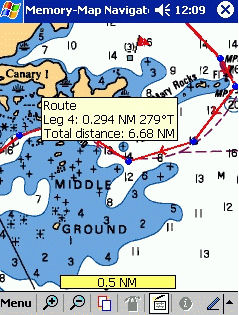
Memory-Map runs on Windows Mobile and supports most GPS units. It allows you to
plan your route on your smartphone or PC and then use a GPS to track your
progress on a map or chart. It keeps tracks of the actual route you took
allowing you to compare it with your planned route. Memory-Map supports a
variety of cartography, including NOAA charts and USGS topographic maps, with
maps covering much of the U.S. and many international locations as well.
The program comes with software for your smartphone and for your PC. To fully
utilize all of the features of Memory-Map you will want the software running in
both places, because some things, such as converting nautical charts, can only
be done on the computer. Memory-Map Navigator supports NOAA charts, which you
must download from the NOAA website and then convert using the PC software.
There are no maps or charts included with the software.
Memory-Map Professional has the features of the Navigator version plus AIS ship
tracking on the PC, large-format printing and the ability for a programmer to
customize the software (with the purchase of 5 licenses).
The bottom line is that Memory-Map has strong support for both NOAA and USGS
topographic maps, although the multi-step conversion process for NOAA charts is
somewhat cumbersome.
For more information visit Memory-Map --
To read this article in its entirety, visit www.activecaptain.com --