The Garmin GPSMAP 440 Basic Chartplotter for $399
Even with low prices, some boaters
are still heading out the inlet without a chartplotter onboard. We find that a bit
mind-boggling, but perhaps the old ones were too expensive, or too complicated,
or too big, or hard to install. Garmin’s new 440 sells for only $399, and has a
street price even lower, so we decided to take a look at it to see if it is worthy
of a BoatTEST recommendation. If it would be good enough for a small boat, then
why not also use it as a remote on a large boat?

|
|
It’s the least expensive plotter in the Garmin lineup at $399, but boaters still are going without one. Once you have used a chartplottter you won’t want to leave home without it. |
Capt. Steve Says…
Before we get too far into this, let us preface by saying we do NOT advocate complete
dependency on electronic navaids. No prudent mariner depends solely on one source
of information for navigation. Tried and true paper charts do not fail when the
battery dies and are not subject to the frailties of electronics. That said… when
such a convenient piece of equipment is available to backup your navigation, it
makes sense to avail yourself of it, especially at the low cost they’re selling
for today.
But Is It Easy to Use…
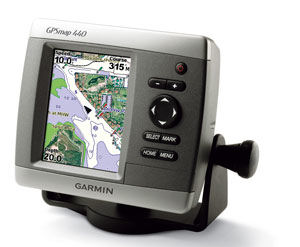
We know technophobes are among us. If you are one, not to worry. The Garmin GPSMAP440
has very few buttons, and the one it does have are intuitive,
which means they change
their function based on what screen you’re on at the moment. That way, you don’t
have to worry about remembering what a dozen buttons are suppose to do.
|
|
|
Capt. Steve says it is easy to mount if you have normal handyman skills. |
Let’s say you’re offshore and suddenly the engine starts running rough. You need
a marine service tech NOW! From the home screen, select where to.
Select the category that you’re looking for (fuel, dining, etc…). A screen with
information of service locations appears. Scroll through them to pick the one you
want and you’ll get detailed information on that specific service center, even on
what credit cards they accept. At the bottom is a Navigate To button.
Select it and you’re on your way. You’ll get a nav screen with detailed information
such as when you’re arriving, directions to destination, and the usual navigation
perks.
Whatever you want to do is as easy as moving the highlighter left, right, up, and
down and pressing the select button. New Englanders used to getting caught in fog
must be dancing a jig.
But Is It Worth the Price…
Well, at $399, the better question would be, is it worth not having?
But to the point, what does your $399 get you. In this instance, quite a bit. The
unit comes to you preloaded with all the charts for the U.S. coastal waters, including
Alaska and Hawaii. But if that’s not enough for you, or you aren’t an offshore aficionado,
then and SD slot accommodates additional charts that you can purchase for inland
lakes of the U.S. and Canada. They are grouped by geographic area so you only need
to purchase the ones you need.
|
|
Note that there are only a few buttons and they operate intuitively. |
Installation…
Still want more? You can add road maps, too. The unit comes with a swivel mounting
kit to easily place it on your dash or console, but if you have room, you can opt
for a flush mount kit (add $24.99) and you’ll also want a protective cover ($10.99).
If fishing is your game, the 440S version has a transducer that lets you use the
unit as a depth sounder and fishfinder. Installations are basic and straightforward
and can be accomplished by anyone with minimal handyman skills. The swivel bracket
is mounted to the dash with three screws. If you opt for the 440S then you’ll have
an additional transducer to install. It mounts with two screws to the hull that
you back with marine sealant. Electrical connections are a red and black wire. Wire
the black to the fuse blocks ground screw, and the red to an empty fuse. A 3 amp
fuse will protect the unit. If you decide on a flush mount, I’d seek outside help
as your cutting into your dash and mistakes can be obvious and inconvenient.
So the Question Remains…
For what size boat is this unit best suited? Its size certainly gears it to the
small fishboat and sportboat market, but it flush mounts for larger boats just as
easily. Typically, if you’re buying a larger boat, a chart plotter is already offered
in the options list, but if you’re retro-fitting onto a larger boat, you will probably
want a large screen and since you got big bucks anyway, go for the big flush-mounted
screen. But if you have a really large boat you might want to consider it as a remote
unit. For example, you could have mounted below by your bunk. Or, if you have an
office, you could mount it on your desk. We have seen some boats that have their
big screen below and mount a small unit, like the Garmin 440 on their flying bridge.
I would recommend the Garmin 440 to anyone who is looking for a cost-effective solution
to a common problem. It has all the navigation features one would need and the features
it lacks from the larger and more expensive units are things like a larger sized
display screen, and real time XM weather, a feature that also has a monthly service
charge associated with it.
Learn
more about the GPSMAP 440 and where to purchase it